Info Regarding At-Large TTF Action Items and Zoom

Dear TTF Members, Please find below information regarding TTF action items related to Zoom, from the Meetings Team: 1. Give instructions on how to download and share the automatic transcription. * Attached 2. Confirm whether recordings can be played from a mobile device. * Yes, if a recording link is shared, it can be opened in a browser on a mobile phone and played back. 3. How to use Zoom on low bandwidth and/or cheaper mobile. What is the usage and is there a work around? * To improve audio experience, turn video off. * https://support.zoom.us/hc/en-us/articles/201179966-System-Requirements-for-... * https://support.zoom.us/hc/en-us/articles/201362893-How-much-bandwidth-do-I-... 4. Confirm what protocol Zoom is using for automated transcriptions. * Zoom has confirmed it's a third party providing the service. Zoom does not disclose which third party. The Meetings Team still has to get more information about the use of screen readers and the request to allow for ongoing chat and post recordings to YouTube. Thank you, Evin

Thanks Evin, in the blog post by Ashwin today, he answers #4 " Confirm what protocol Zoom is using for automated transcriptions." with " This feature is powered by Otter.ai (https://otter.ai/zoom), an AI solution which partnered with Zoom for transcription. Dev Anand On Sun, Jun 23, 2019 at 3:46 PM Evin Erdogdu <evin.erdogdu@icann.org> wrote:
Dear TTF Members,
Please find below information regarding TTF action items related to Zoom, from the Meetings Team:
1. Give instructions on how to download and share the automatic transcription. 1. Attached 2. Confirm whether recordings can be played from a mobile device. 1. Yes, if a recording link is shared, it can be opened in a browser on a mobile phone and played back. 3. How to use Zoom on low bandwidth and/or cheaper mobile. What is the usage and is there a work around? 1. To improve audio experience, turn video off. 2. https://support.zoom.us/hc/en-us/articles/201179966-System-Requirements-for-... 3. https://support.zoom.us/hc/en-us/articles/201362893-How-much-bandwidth-do-I-... 4. Confirm what protocol Zoom is using for automated transcriptions. 1. Zoom has confirmed it’s a third party providing the service. Zoom does not disclose which third party.
The Meetings Team still has to get more information about the use of screen readers and the request to allow for ongoing chat and post recordings to YouTube.
Thank you,
Evin _______________________________________________ ttf mailing list ttf@atlarge-lists.icann.org https://mm.icann.org/mailman/listinfo/ttf
_______________________________________________ By submitting your personal data, you consent to the processing of your personal data for purposes of subscribing to this mailing list accordance with the ICANN Privacy Policy (https://www.icann.org/privacy/policy) and the website Terms of Service (https://www.icann.org/privacy/tos). You can visit the Mailman link above to change your membership status or configuration, including unsubscribing, setting digest-style delivery or disabling delivery altogether (e.g., for a vacation), and so on.

Hi Evin, Screen readers do not seem to have a problem with zoom. It works well with apple's voice over technology but complete experience can be provided by Muhammad Shabbir who uses a screen reader with zoom. Shabbir can you elaborate on this Judith Sent from my iPad judith@jhellerstein.com Skype ID:JudithHellerstein
On Jun 23, 2019, at 10:58 PM, Dev Anand Teelucksingh <devtee@gmail.com> wrote:
Thanks Evin, in the blog post by Ashwin today, he answers #4 " Confirm what protocol Zoom is using for automated transcriptions." with " This feature is powered by Otter.ai (https://otter.ai/zoom), an AI solution which partnered with Zoom for transcription.
Dev Anand
On Sun, Jun 23, 2019 at 3:46 PM Evin Erdogdu <evin.erdogdu@icann.org> wrote: Dear TTF Members,
Please find below information regarding TTF action items related to Zoom, from the Meetings Team:
Give instructions on how to download and share the automatic transcription. Attached Confirm whether recordings can be played from a mobile device. Yes, if a recording link is shared, it can be opened in a browser on a mobile phone and played back. How to use Zoom on low bandwidth and/or cheaper mobile. What is the usage and is there a work around? To improve audio experience, turn video off. https://support.zoom.us/hc/en-us/articles/201179966-System-Requirements-for-... https://support.zoom.us/hc/en-us/articles/201362893-How-much-bandwidth-do-I-... Confirm what protocol Zoom is using for automated transcriptions. Zoom has confirmed it’s a third party providing the service. Zoom does not disclose which third party.
The Meetings Team still has to get more information about the use of screen readers and the request to allow for ongoing chat and post recordings to YouTube.
Thank you,
Evin
_______________________________________________ ttf mailing list ttf@atlarge-lists.icann.org https://mm.icann.org/mailman/listinfo/ttf
_______________________________________________ By submitting your personal data, you consent to the processing of your personal data for purposes of subscribing to this mailing list accordance with the ICANN Privacy Policy (https://www.icann.org/privacy/policy) and the website Terms of Service (https://www.icann.org/privacy/tos). You can visit the Mailman link above to change your membership status or configuration, including unsubscribing, setting digest-style delivery or disabling delivery altogether (e.g., for a vacation), and so on.
ttf mailing list ttf@atlarge-lists.icann.org https://mm.icann.org/mailman/listinfo/ttf
_______________________________________________ By submitting your personal data, you consent to the processing of your personal data for purposes of subscribing to this mailing list accordance with the ICANN Privacy Policy (https://www.icann.org/privacy/policy) and the website Terms of Service (https://www.icann.org/privacy/tos). You can visit the Mailman link above to change your membership status or configuration, including unsubscribing, setting digest-style delivery or disabling delivery altogether (e.g., for a vacation), and so on.

Hi Judith, All, I have used Zoom mostly with my iPhone and found it accessible than Adobe and Webex. I found below post related to Zoom accessibility useful: https://zoom.us/accessibility Best, Muhammad Shabbir Awan President, Internet Society Accessibility Special Interest Group. Mobile: +92-3005500991. Email: mshabbirawan@gmail.com Twitter: https://www.twitter.com/mshabirawan Website: http://www.a11ysig.org From: Judith Hellerstein <judith@jhellerstein.com> Sent: Monday, June 24, 2019 3:04 AM To: Dev Anand Teelucksingh <devtee@gmail.com> Cc: Evin Erdogdu <evin.erdogdu@icann.org>; ttf@atlarge-lists.icann.org; mshabbirawan@gmail.com Subject: Re: [technology taskforce] Info Regarding At-Large TTF Action Items and Zoom Hi Evin, Screen readers do not seem to have a problem with zoom. It works well with apple's voice over technology but complete experience can be provided by Muhammad Shabbir who uses a screen reader with zoom. Shabbir can you elaborate on this Judith Sent from my iPad judith@jhellerstein.com Skype ID:JudithHellerstein On Jun 23, 2019, at 10:58 PM, Dev Anand Teelucksingh <devtee@gmail.com <mailto:devtee@gmail.com> > wrote: Thanks Evin, in the blog post by Ashwin today, he answers #4 " Confirm what protocol Zoom is using for automated transcriptions." with " This feature is powered by Otter.ai (https://otter.ai/zoom), an AI solution which partnered with Zoom for transcription. Dev Anand On Sun, Jun 23, 2019 at 3:46 PM Evin Erdogdu <evin.erdogdu@icann.org <mailto:evin.erdogdu@icann.org> > wrote: Dear TTF Members, Please find below information regarding TTF action items related to Zoom, from the Meetings Team: 1. Give instructions on how to download and share the automatic transcription. a. Attached 2. Confirm whether recordings can be played from a mobile device. a. Yes, if a recording link is shared, it can be opened in a browser on a mobile phone and played back. 3. How to use Zoom on low bandwidth and/or cheaper mobile. What is the usage and is there a work around? a. To improve audio experience, turn video off. b. https://support.zoom.us/hc/en-us/articles/201179966-System-Requirements-for-... c. <https://support.zoom.us/hc/en-us/articles/201362893-How-much-bandwidth-do-I-...> https://support.zoom.us/hc/en-us/articles/201362893-How-much-bandwidth-do-I-... 4. Confirm what protocol Zoom is using for automated transcriptions. a. Zoom has confirmed it’s a third party providing the service. Zoom does not disclose which third party. The Meetings Team still has to get more information about the use of screen readers and the request to allow for ongoing chat and post recordings to YouTube. Thank you, Evin _______________________________________________ ttf mailing list ttf@atlarge-lists.icann.org <mailto:ttf@atlarge-lists.icann.org> https://mm.icann.org/mailman/listinfo/ttf _______________________________________________ By submitting your personal data, you consent to the processing of your personal data for purposes of subscribing to this mailing list accordance with the ICANN Privacy Policy (https://www.icann.org/privacy/policy) and the website Terms of Service (https://www.icann.org/privacy/tos). You can visit the Mailman link above to change your membership status or configuration, including unsubscribing, setting digest-style delivery or disabling delivery altogether (e.g., for a vacation), and so on. _______________________________________________ ttf mailing list ttf@atlarge-lists.icann.org <mailto:ttf@atlarge-lists.icann.org> https://mm.icann.org/mailman/listinfo/ttf _______________________________________________ By submitting your personal data, you consent to the processing of your personal data for purposes of subscribing to this mailing list accordance with the ICANN Privacy Policy (https://www.icann.org/privacy/policy) and the website Terms of Service (https://www.icann.org/privacy/tos). You can visit the Mailman link above to change your membership status or configuration, including unsubscribing, setting digest-style delivery or disabling delivery altogether (e.g., for a vacation), and so on.

Hi All, Thanks for sharing your information and experiences . It's seems to fine in my android phone and PC . Best Regards, Jahangir Hossain Vice Chair, Board of Trustee Internet Society Bangladesh http://internetsociety.org.bd https://bd.linkedin.com/in/jrjahangir On Mon, Jun 24, 2019 at 1:46 AM Evin Erdogdu <evin.erdogdu@icann.org> wrote:
Dear TTF Members,
Please find below information regarding TTF action items related to Zoom, from the Meetings Team:
1. Give instructions on how to download and share the automatic transcription. 1. Attached 2. Confirm whether recordings can be played from a mobile device. 1. Yes, if a recording link is shared, it can be opened in a browser on a mobile phone and played back. 3. How to use Zoom on low bandwidth and/or cheaper mobile. What is the usage and is there a work around? 1. To improve audio experience, turn video off. 2. https://support.zoom.us/hc/en-us/articles/201179966-System-Requirements-for-... 3. https://support.zoom.us/hc/en-us/articles/201362893-How-much-bandwidth-do-I-... 4. Confirm what protocol Zoom is using for automated transcriptions. 1. Zoom has confirmed it’s a third party providing the service. Zoom does not disclose which third party.
The Meetings Team still has to get more information about the use of screen readers and the request to allow for ongoing chat and post recordings to YouTube.
Thank you,
Evin _______________________________________________ ttf mailing list ttf@atlarge-lists.icann.org https://mm.icann.org/mailman/listinfo/ttf
_______________________________________________ By submitting your personal data, you consent to the processing of your personal data for purposes of subscribing to this mailing list accordance with the ICANN Privacy Policy (https://www.icann.org/privacy/policy) and the website Terms of Service (https://www.icann.org/privacy/tos). You can visit the Mailman link above to change your membership status or configuration, including unsubscribing, setting digest-style delivery or disabling delivery altogether (e.g., for a vacation), and so on.
Hi All, Have anyone use zoom multiple meeting session at the same time? Best Regards, Jahangir Hossain Vice Chair, Board of Trustee Internet Society Bangladesh http://internetsociety.org.bd https://bd.linkedin.com/in/jrjahangir On Mon, Jun 24, 2019 at 10:06 AM Jahangir Hossain <jrjahangir@gmail.com> wrote:
Hi All, Thanks for sharing your information and experiences . It's seems to fine in my android phone and PC .
Best Regards, Jahangir Hossain Vice Chair, Board of Trustee Internet Society Bangladesh http://internetsociety.org.bd https://bd.linkedin.com/in/jrjahangir
On Mon, Jun 24, 2019 at 1:46 AM Evin Erdogdu <evin.erdogdu@icann.org> wrote:
Dear TTF Members,
Please find below information regarding TTF action items related to Zoom, from the Meetings Team:
1. Give instructions on how to download and share the automatic transcription. 1. Attached 2. Confirm whether recordings can be played from a mobile device. 1. Yes, if a recording link is shared, it can be opened in a browser on a mobile phone and played back. 3. How to use Zoom on low bandwidth and/or cheaper mobile. What is the usage and is there a work around? 1. To improve audio experience, turn video off. 2. https://support.zoom.us/hc/en-us/articles/201179966-System-Requirements-for-... 3. https://support.zoom.us/hc/en-us/articles/201362893-How-much-bandwidth-do-I-... 4. Confirm what protocol Zoom is using for automated transcriptions. 1. Zoom has confirmed it’s a third party providing the service. Zoom does not disclose which third party.
The Meetings Team still has to get more information about the use of screen readers and the request to allow for ongoing chat and post recordings to YouTube.
Thank you,
Evin _______________________________________________ ttf mailing list ttf@atlarge-lists.icann.org https://mm.icann.org/mailman/listinfo/ttf
_______________________________________________ By submitting your personal data, you consent to the processing of your personal data for purposes of subscribing to this mailing list accordance with the ICANN Privacy Policy (https://www.icann.org/privacy/policy) and the website Terms of Service (https://www.icann.org/privacy/tos). You can visit the Mailman link above to change your membership status or configuration, including unsubscribing, setting digest-style delivery or disabling delivery altogether (e.g., for a vacation), and so on.

Doesn't look like there's any easy way to run two instances of Zoom, the reason being even if the links are opened from two different browsers (such as Firefox and Chrome), the actual Zoom instance is an external process, which only permits one instance. If you really want to run two Zoom instances from the same machine, it may be possible through running a virtual instance of a different OS (such as VirtualBox running two OSes). It may be much easier to use two devices (such as a laptop and an Android phone). With kind regards, satish On Mon, Jun 24, 2019 at 1:38 PM Jahangir Hossain <jrjahangir@gmail.com> wrote:
Hi All, Have anyone use zoom multiple meeting session at the same time?
Best Regards, Jahangir Hossain Vice Chair, Board of Trustee Internet Society Bangladesh http://internetsociety.org.bd https://bd.linkedin.com/in/jrjahangir
On Mon, Jun 24, 2019 at 10:06 AM Jahangir Hossain <jrjahangir@gmail.com> wrote:
Hi All, Thanks for sharing your information and experiences . It's seems to fine in my android phone and PC .
Best Regards, Jahangir Hossain Vice Chair, Board of Trustee Internet Society Bangladesh http://internetsociety.org.bd https://bd.linkedin.com/in/jrjahangir
On Mon, Jun 24, 2019 at 1:46 AM Evin Erdogdu <evin.erdogdu@icann.org> wrote:
Dear TTF Members,
Please find below information regarding TTF action items related to Zoom, from the Meetings Team:
1. Give instructions on how to download and share the automatic transcription. 1. Attached 2. Confirm whether recordings can be played from a mobile device. 1. Yes, if a recording link is shared, it can be opened in a browser on a mobile phone and played back. 3. How to use Zoom on low bandwidth and/or cheaper mobile. What is the usage and is there a work around? 1. To improve audio experience, turn video off. 2. https://support.zoom.us/hc/en-us/articles/201179966-System-Requirements-for-... 3. https://support.zoom.us/hc/en-us/articles/201362893-How-much-bandwidth-do-I-... 4. Confirm what protocol Zoom is using for automated transcriptions. 1. Zoom has confirmed it’s a third party providing the service. Zoom does not disclose which third party.
The Meetings Team still has to get more information about the use of screen readers and the request to allow for ongoing chat and post recordings to YouTube.
Thank you,
Evin _______________________________________________ ttf mailing list ttf@atlarge-lists.icann.org https://mm.icann.org/mailman/listinfo/ttf
_______________________________________________ By submitting your personal data, you consent to the processing of your personal data for purposes of subscribing to this mailing list accordance with the ICANN Privacy Policy (https://www.icann.org/privacy/policy) and the website Terms of Service (https://www.icann.org/privacy/tos). You can visit the Mailman link above to change your membership status or configuration, including unsubscribing, setting digest-style delivery or disabling delivery altogether (e.g., for a vacation), and so on.
_______________________________________________ ttf mailing list ttf@atlarge-lists.icann.org https://mm.icann.org/mailman/listinfo/ttf
_______________________________________________ By submitting your personal data, you consent to the processing of your personal data for purposes of subscribing to this mailing list accordance with the ICANN Privacy Policy (https://www.icann.org/privacy/policy) and the website Terms of Service (https://www.icann.org/privacy/tos). You can visit the Mailman link above to change your membership status or configuration, including unsubscribing, setting digest-style delivery or disabling delivery altogether (e.g., for a vacation), and so on.
Hi Satish da, Thanks for sharing your information and suggestion . Best Regards, Jahangir Hossain Vice Chair, Board of Trustee Internet Society Bangladesh http://internetsociety.org.bd https://bd.linkedin.com/in/jrjahangir On Mon, Jun 24, 2019 at 2:17 PM Satish Babu <sbabu@ieee.org> wrote:
Doesn't look like there's any easy way to run two instances of Zoom, the reason being even if the links are opened from two different browsers (such as Firefox and Chrome), the actual Zoom instance is an external process, which only permits one instance.
If you really want to run two Zoom instances from the same machine, it may be possible through running a virtual instance of a different OS (such as VirtualBox running two OSes). It may be much easier to use two devices (such as a laptop and an Android phone).
With kind regards,
satish
On Mon, Jun 24, 2019 at 1:38 PM Jahangir Hossain <jrjahangir@gmail.com> wrote:
Hi All, Have anyone use zoom multiple meeting session at the same time?
Best Regards, Jahangir Hossain Vice Chair, Board of Trustee Internet Society Bangladesh http://internetsociety.org.bd https://bd.linkedin.com/in/jrjahangir
On Mon, Jun 24, 2019 at 10:06 AM Jahangir Hossain <jrjahangir@gmail.com> wrote:
Hi All, Thanks for sharing your information and experiences . It's seems to fine in my android phone and PC .
Best Regards, Jahangir Hossain Vice Chair, Board of Trustee Internet Society Bangladesh http://internetsociety.org.bd https://bd.linkedin.com/in/jrjahangir
On Mon, Jun 24, 2019 at 1:46 AM Evin Erdogdu <evin.erdogdu@icann.org> wrote:
Dear TTF Members,
Please find below information regarding TTF action items related to Zoom, from the Meetings Team:
1. Give instructions on how to download and share the automatic transcription. 1. Attached 2. Confirm whether recordings can be played from a mobile device. 1. Yes, if a recording link is shared, it can be opened in a browser on a mobile phone and played back. 3. How to use Zoom on low bandwidth and/or cheaper mobile. What is the usage and is there a work around? 1. To improve audio experience, turn video off. 2. https://support.zoom.us/hc/en-us/articles/201179966-System-Requirements-for-... 3. https://support.zoom.us/hc/en-us/articles/201362893-How-much-bandwidth-do-I-... 4. Confirm what protocol Zoom is using for automated transcriptions. 1. Zoom has confirmed it’s a third party providing the service. Zoom does not disclose which third party.
The Meetings Team still has to get more information about the use of screen readers and the request to allow for ongoing chat and post recordings to YouTube.
Thank you,
Evin _______________________________________________ ttf mailing list ttf@atlarge-lists.icann.org https://mm.icann.org/mailman/listinfo/ttf
_______________________________________________ By submitting your personal data, you consent to the processing of your personal data for purposes of subscribing to this mailing list accordance with the ICANN Privacy Policy (https://www.icann.org/privacy/policy) and the website Terms of Service (https://www.icann.org/privacy/tos). You can visit the Mailman link above to change your membership status or configuration, including unsubscribing, setting digest-style delivery or disabling delivery altogether (e.g., for a vacation), and so on.
_______________________________________________ ttf mailing list ttf@atlarge-lists.icann.org https://mm.icann.org/mailman/listinfo/ttf
_______________________________________________ By submitting your personal data, you consent to the processing of your personal data for purposes of subscribing to this mailing list accordance with the ICANN Privacy Policy (https://www.icann.org/privacy/policy) and the website Terms of Service (https://www.icann.org/privacy/tos). You can visit the Mailman link above to change your membership status or configuration, including unsubscribing, setting digest-style delivery or disabling delivery altogether (e.g., for a vacation), and so on.

Hello all, indeed, I have tried to run multiple instances of zoom from different browsers and this doesn't work at all. This is also valid of one runs zoom as a Web app. The running of an external process, also is blocked in secure environments that do not allow external software to run, thus I have found that some people have been unable to access Zoom at work. FYI Adobe Connect allowed for multiple instances to run, as each were running in their own browser Window. I have a feeling that any change to allow for multiple instances of Zoom to run simultaneously is likely to require for extended re-writing of the Zoom architecture. In the short to medium term, my way to get around it is to run another room on another device, such as Mobile phone or Tablet. Kindest regards, Olivier On 24/06/2019 09:16, Satish Babu wrote:
Doesn't look like there's any easy way to run two instances of Zoom, the reason being even if the links are opened from two different browsers (such as Firefox and Chrome), the actual Zoom instance is an external process, which only permits one instance.
If you really want to run two Zoom instances from the same machine, it may be possible through running a virtual instance of a different OS (such as VirtualBox running two OSes). It may be much easier to use two devices (such as a laptop and an Android phone).
With kind regards,
satish
On Mon, Jun 24, 2019 at 1:38 PM Jahangir Hossain <jrjahangir@gmail.com <mailto:jrjahangir@gmail.com>> wrote:
Hi All, Have anyone use zoom multiple meeting session at the same time?
Best Regards, JahangirHossain Vice Chair, Board of Trustee Internet Society Bangladesh http://internetsociety.org.bd https://bd.linkedin.com/in/jrjahangir
On Mon, Jun 24, 2019 at 10:06 AM Jahangir Hossain <jrjahangir@gmail.com <mailto:jrjahangir@gmail.com>> wrote:
Hi All, Thanks for sharing your information and experiences . It's seems to fine in my android phone and PC .
Best Regards, JahangirHossain Vice Chair, Board of Trustee Internet Society Bangladesh http://internetsociety.org.bd https://bd.linkedin.com/in/jrjahangir
On Mon, Jun 24, 2019 at 1:46 AM Evin Erdogdu <evin.erdogdu@icann.org <mailto:evin.erdogdu@icann.org>> wrote:
Dear TTF Members,
Please find below information regarding TTF action items related to Zoom, from the Meetings Team:
1. Give instructions on how to download and share the automatic transcription. 1. Attached 2. Confirm whether recordings can be played from a mobile device. 1. Yes, if a recording link is shared, it can be opened in a browser on a mobile phone and played back. 3. How to use Zoom on low bandwidth and/or cheaper mobile. What is the usage and is there a work around? 1. To improve audio experience, turn video off. 2. https://support.zoom.us/hc/en-us/articles/201179966-System-Requirements-for-... 3. https://support.zoom.us/hc/en-us/articles/201362893-How-much-bandwidth-do-I-... 4. Confirm what protocol Zoom is using for automated transcriptions. 1. Zoom has confirmed it’s a third party providing the service. Zoom does not disclose which third party.
The Meetings Team still has to get more information about the use of screen readers and the request to allow for ongoing chat and post recordings to YouTube.
Thank you,
Evin
_______________________________________________ ttf mailing list ttf@atlarge-lists.icann.org <mailto:ttf@atlarge-lists.icann.org> https://mm.icann.org/mailman/listinfo/ttf
_______________________________________________ By submitting your personal data, you consent to the processing of your personal data for purposes of subscribing to this mailing list accordance with the ICANN Privacy Policy (https://www.icann.org/privacy/policy) and the website Terms of Service (https://www.icann.org/privacy/tos). You can visit the Mailman link above to change your membership status or configuration, including unsubscribing, setting digest-style delivery or disabling delivery altogether (e.g., for a vacation), and so on.
_______________________________________________ ttf mailing list ttf@atlarge-lists.icann.org <mailto:ttf@atlarge-lists.icann.org> https://mm.icann.org/mailman/listinfo/ttf
_______________________________________________ By submitting your personal data, you consent to the processing of your personal data for purposes of subscribing to this mailing list accordance with the ICANN Privacy Policy (https://www.icann.org/privacy/policy) and the website Terms of Service (https://www.icann.org/privacy/tos). You can visit the Mailman link above to change your membership status or configuration, including unsubscribing, setting digest-style delivery or disabling delivery altogether (e.g., for a vacation), and so on.
_______________________________________________ ttf mailing list ttf@atlarge-lists.icann.org https://mm.icann.org/mailman/listinfo/ttf
_______________________________________________ By submitting your personal data, you consent to the processing of your personal data for purposes of subscribing to this mailing list accordance with the ICANN Privacy Policy (https://www.icann.org/privacy/policy) and the website Terms of Service (https://www.icann.org/privacy/tos). You can visit the Mailman link above to change your membership status or configuration, including unsubscribing, setting digest-style delivery or disabling delivery altogether (e.g., for a vacation), and so on.
-- Olivier MJ Crépin-Leblond, PhD http://www.gih.com/ocl.html
What Olivier has said is consistent with what I have experienced as well. The following page from Zoom Support hints that there is some way to run multiple sessions (apparently, this works only for Enterprise Accounts): https://support.zoom.us/hc/en-us/articles/360001120743-Join-Multiple-Meeting... satish On Mon, Jun 24, 2019 at 2:10 PM Olivier MJ Crépin-Leblond <ocl@gih.com> wrote:
Hello all,
indeed, I have tried to run multiple instances of zoom from different browsers and this doesn't work at all. This is also valid of one runs zoom as a Web app. The running of an external process, also is blocked in secure environments that do not allow external software to run, thus I have found that some people have been unable to access Zoom at work. FYI Adobe Connect allowed for multiple instances to run, as each were running in their own browser Window.
I have a feeling that any change to allow for multiple instances of Zoom to run simultaneously is likely to require for extended re-writing of the Zoom architecture. In the short to medium term, my way to get around it is to run another room on another device, such as Mobile phone or Tablet.
Kindest regards,
Olivier
On 24/06/2019 09:16, Satish Babu wrote:
Doesn't look like there's any easy way to run two instances of Zoom, the reason being even if the links are opened from two different browsers (such as Firefox and Chrome), the actual Zoom instance is an external process, which only permits one instance.
If you really want to run two Zoom instances from the same machine, it may be possible through running a virtual instance of a different OS (such as VirtualBox running two OSes). It may be much easier to use two devices (such as a laptop and an Android phone).
With kind regards,
satish
On Mon, Jun 24, 2019 at 1:38 PM Jahangir Hossain <jrjahangir@gmail.com> wrote:
Hi All, Have anyone use zoom multiple meeting session at the same time?
Best Regards, Jahangir Hossain Vice Chair, Board of Trustee Internet Society Bangladesh http://internetsociety.org.bd https://bd.linkedin.com/in/jrjahangir
On Mon, Jun 24, 2019 at 10:06 AM Jahangir Hossain <jrjahangir@gmail.com> wrote:
Hi All, Thanks for sharing your information and experiences . It's seems to fine in my android phone and PC .
Best Regards, Jahangir Hossain Vice Chair, Board of Trustee Internet Society Bangladesh http://internetsociety.org.bd https://bd.linkedin.com/in/jrjahangir
On Mon, Jun 24, 2019 at 1:46 AM Evin Erdogdu <evin.erdogdu@icann.org> wrote:
Dear TTF Members,
Please find below information regarding TTF action items related to Zoom, from the Meetings Team:
1. Give instructions on how to download and share the automatic transcription. 1. Attached 2. Confirm whether recordings can be played from a mobile device. 1. Yes, if a recording link is shared, it can be opened in a browser on a mobile phone and played back. 3. How to use Zoom on low bandwidth and/or cheaper mobile. What is the usage and is there a work around? 1. To improve audio experience, turn video off. 2. https://support.zoom.us/hc/en-us/articles/201179966-System-Requirements-for-... 3. https://support.zoom.us/hc/en-us/articles/201362893-How-much-bandwidth-do-I-... 4. Confirm what protocol Zoom is using for automated transcriptions. 1. Zoom has confirmed it’s a third party providing the service. Zoom does not disclose which third party.
The Meetings Team still has to get more information about the use of screen readers and the request to allow for ongoing chat and post recordings to YouTube.
Thank you,
Evin _______________________________________________ ttf mailing list ttf@atlarge-lists.icann.org https://mm.icann.org/mailman/listinfo/ttf
_______________________________________________ By submitting your personal data, you consent to the processing of your personal data for purposes of subscribing to this mailing list accordance with the ICANN Privacy Policy (https://www.icann.org/privacy/policy) and the website Terms of Service (https://www.icann.org/privacy/tos). You can visit the Mailman link above to change your membership status or configuration, including unsubscribing, setting digest-style delivery or disabling delivery altogether (e.g., for a vacation), and so on.
_______________________________________________ ttf mailing list ttf@atlarge-lists.icann.org https://mm.icann.org/mailman/listinfo/ttf
_______________________________________________ By submitting your personal data, you consent to the processing of your personal data for purposes of subscribing to this mailing list accordance with the ICANN Privacy Policy (https://www.icann.org/privacy/policy) and the website Terms of Service (https://www.icann.org/privacy/tos). You can visit the Mailman link above to change your membership status or configuration, including unsubscribing, setting digest-style delivery or disabling delivery altogether (e.g., for a vacation), and so on.
_______________________________________________ ttf mailing listttf@atlarge-lists.icann.orghttps://mm.icann.org/mailman/listinfo/ttf
_______________________________________________ By submitting your personal data, you consent to the processing of your personal data for purposes of subscribing to this mailing list accordance with the ICANN Privacy Policy (https://www.icann.org/privacy/policy) and the website Terms of Service (https://www.icann.org/privacy/tos). You can visit the Mailman link above to change your membership status or configuration, including unsubscribing, setting digest-style delivery or disabling delivery altogether (e.g., for a vacation), and so on.
-- Olivier MJ Crépin-Leblond, PhDhttp://www.gih.com/ocl.html
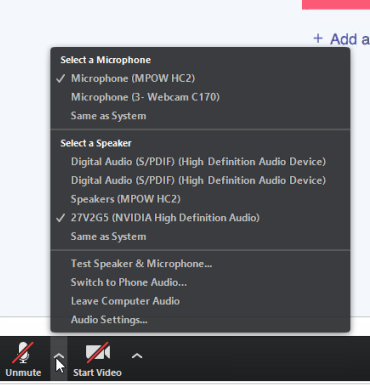
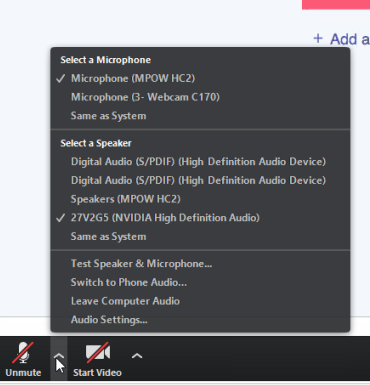
On Windows 10 using Firefox, I can join a Zoom session within the browser only - which allows me to see the screen of the presenter within the browser tab. You can then open the audio stream using VLC to hear what is being said. Within the Zoom app itself, if you have multiple audio sources you can select what audio sources you want to use by clicking on the arrow next to the Mute/Unmute so if one had a different audio speaker like a headphone, you could therefore redirect the audio output from the Zoom app to that headphone. Dev Anand [image: i_view32_7laSlh32MR.png] On Mon, Jun 24, 2019 at 4:47 AM Satish Babu <sbabu@ieee.org> wrote:
What Olivier has said is consistent with what I have experienced as well.
The following page from Zoom Support hints that there is some way to run multiple sessions (apparently, this works only for Enterprise Accounts):
https://support.zoom.us/hc/en-us/articles/360001120743-Join-Multiple-Meeting...
satish
On Mon, Jun 24, 2019 at 2:10 PM Olivier MJ Crépin-Leblond <ocl@gih.com> wrote:
Hello all,
indeed, I have tried to run multiple instances of zoom from different browsers and this doesn't work at all. This is also valid of one runs zoom as a Web app. The running of an external process, also is blocked in secure environments that do not allow external software to run, thus I have found that some people have been unable to access Zoom at work. FYI Adobe Connect allowed for multiple instances to run, as each were running in their own browser Window.
I have a feeling that any change to allow for multiple instances of Zoom to run simultaneously is likely to require for extended re-writing of the Zoom architecture. In the short to medium term, my way to get around it is to run another room on another device, such as Mobile phone or Tablet.
Kindest regards,
Olivier
On 24/06/2019 09:16, Satish Babu wrote:
Doesn't look like there's any easy way to run two instances of Zoom, the reason being even if the links are opened from two different browsers (such as Firefox and Chrome), the actual Zoom instance is an external process, which only permits one instance.
If you really want to run two Zoom instances from the same machine, it may be possible through running a virtual instance of a different OS (such as VirtualBox running two OSes). It may be much easier to use two devices (such as a laptop and an Android phone).
With kind regards,
satish
On Mon, Jun 24, 2019 at 1:38 PM Jahangir Hossain <jrjahangir@gmail.com> wrote:
Hi All, Have anyone use zoom multiple meeting session at the same time?
Best Regards, Jahangir Hossain Vice Chair, Board of Trustee Internet Society Bangladesh http://internetsociety.org.bd https://bd.linkedin.com/in/jrjahangir
On Mon, Jun 24, 2019 at 10:06 AM Jahangir Hossain <jrjahangir@gmail.com> wrote:
Hi All, Thanks for sharing your information and experiences . It's seems to fine in my android phone and PC .
Best Regards, Jahangir Hossain Vice Chair, Board of Trustee Internet Society Bangladesh http://internetsociety.org.bd https://bd.linkedin.com/in/jrjahangir
On Mon, Jun 24, 2019 at 1:46 AM Evin Erdogdu <evin.erdogdu@icann.org> wrote:
Dear TTF Members,
Please find below information regarding TTF action items related to Zoom, from the Meetings Team:
1. Give instructions on how to download and share the automatic transcription. 1. Attached 2. Confirm whether recordings can be played from a mobile device. 1. Yes, if a recording link is shared, it can be opened in a browser on a mobile phone and played back. 3. How to use Zoom on low bandwidth and/or cheaper mobile. What is the usage and is there a work around? 1. To improve audio experience, turn video off. 2. https://support.zoom.us/hc/en-us/articles/201179966-System-Requirements-for-... 3. https://support.zoom.us/hc/en-us/articles/201362893-How-much-bandwidth-do-I-... 4. Confirm what protocol Zoom is using for automated transcriptions. 1. Zoom has confirmed it’s a third party providing the service. Zoom does not disclose which third party.
The Meetings Team still has to get more information about the use of screen readers and the request to allow for ongoing chat and post recordings to YouTube.
Thank you,
Evin _______________________________________________ ttf mailing list ttf@atlarge-lists.icann.org https://mm.icann.org/mailman/listinfo/ttf
_______________________________________________ By submitting your personal data, you consent to the processing of your personal data for purposes of subscribing to this mailing list accordance with the ICANN Privacy Policy ( https://www.icann.org/privacy/policy) and the website Terms of Service (https://www.icann.org/privacy/tos). You can visit the Mailman link above to change your membership status or configuration, including unsubscribing, setting digest-style delivery or disabling delivery altogether (e.g., for a vacation), and so on.
_______________________________________________ ttf mailing list ttf@atlarge-lists.icann.org https://mm.icann.org/mailman/listinfo/ttf
_______________________________________________ By submitting your personal data, you consent to the processing of your personal data for purposes of subscribing to this mailing list accordance with the ICANN Privacy Policy (https://www.icann.org/privacy/policy) and the website Terms of Service (https://www.icann.org/privacy/tos). You can visit the Mailman link above to change your membership status or configuration, including unsubscribing, setting digest-style delivery or disabling delivery altogether (e.g., for a vacation), and so on.
_______________________________________________ ttf mailing listttf@atlarge-lists.icann.orghttps://mm.icann.org/mailman/listinfo/ttf
_______________________________________________ By submitting your personal data, you consent to the processing of your personal data for purposes of subscribing to this mailing list accordance with the ICANN Privacy Policy (https://www.icann.org/privacy/policy) and the website Terms of Service (https://www.icann.org/privacy/tos). You can visit the Mailman link above to change your membership status or configuration, including unsubscribing, setting digest-style delivery or disabling delivery altogether (e.g., for a vacation), and so on.
-- Olivier MJ Crépin-Leblond, PhDhttp://www.gih.com/ocl.html
_______________________________________________ ttf mailing list ttf@atlarge-lists.icann.org https://mm.icann.org/mailman/listinfo/ttf
_______________________________________________ By submitting your personal data, you consent to the processing of your personal data for purposes of subscribing to this mailing list accordance with the ICANN Privacy Policy (https://www.icann.org/privacy/policy) and the website Terms of Service (https://www.icann.org/privacy/tos). You can visit the Mailman link above to change your membership status or configuration, including unsubscribing, setting digest-style delivery or disabling delivery altogether (e.g., for a vacation), and so on.
Hi Dev, It's really helpful :) Best Regards, Jahangir Hossain Vice Chair, Board of Trustee Internet Society Bangladesh http://internetsociety.org.bd https://bd.linkedin.com/in/jrjahangir On Mon, Jun 24, 2019 at 7:26 PM Dev Anand Teelucksingh <devtee@gmail.com> wrote:
On Windows 10 using Firefox, I can join a Zoom session within the browser only - which allows me to see the screen of the presenter within the browser tab. You can then open the audio stream using VLC to hear what is being said.
Within the Zoom app itself, if you have multiple audio sources you can select what audio sources you want to use by clicking on the arrow next to the Mute/Unmute so if one had a different audio speaker like a headphone, you could therefore redirect the audio output from the Zoom app to that headphone.
Dev Anand
[image: i_view32_7laSlh32MR.png]
On Mon, Jun 24, 2019 at 4:47 AM Satish Babu <sbabu@ieee.org> wrote:
What Olivier has said is consistent with what I have experienced as well.
The following page from Zoom Support hints that there is some way to run multiple sessions (apparently, this works only for Enterprise Accounts):
https://support.zoom.us/hc/en-us/articles/360001120743-Join-Multiple-Meeting...
satish
On Mon, Jun 24, 2019 at 2:10 PM Olivier MJ Crépin-Leblond <ocl@gih.com> wrote:
Hello all,
indeed, I have tried to run multiple instances of zoom from different browsers and this doesn't work at all. This is also valid of one runs zoom as a Web app. The running of an external process, also is blocked in secure environments that do not allow external software to run, thus I have found that some people have been unable to access Zoom at work. FYI Adobe Connect allowed for multiple instances to run, as each were running in their own browser Window.
I have a feeling that any change to allow for multiple instances of Zoom to run simultaneously is likely to require for extended re-writing of the Zoom architecture. In the short to medium term, my way to get around it is to run another room on another device, such as Mobile phone or Tablet.
Kindest regards,
Olivier
On 24/06/2019 09:16, Satish Babu wrote:
Doesn't look like there's any easy way to run two instances of Zoom, the reason being even if the links are opened from two different browsers (such as Firefox and Chrome), the actual Zoom instance is an external process, which only permits one instance.
If you really want to run two Zoom instances from the same machine, it may be possible through running a virtual instance of a different OS (such as VirtualBox running two OSes). It may be much easier to use two devices (such as a laptop and an Android phone).
With kind regards,
satish
On Mon, Jun 24, 2019 at 1:38 PM Jahangir Hossain <jrjahangir@gmail.com> wrote:
Hi All, Have anyone use zoom multiple meeting session at the same time?
Best Regards, Jahangir Hossain Vice Chair, Board of Trustee Internet Society Bangladesh http://internetsociety.org.bd https://bd.linkedin.com/in/jrjahangir
On Mon, Jun 24, 2019 at 10:06 AM Jahangir Hossain <jrjahangir@gmail.com> wrote:
Hi All, Thanks for sharing your information and experiences . It's seems to fine in my android phone and PC .
Best Regards, Jahangir Hossain Vice Chair, Board of Trustee Internet Society Bangladesh http://internetsociety.org.bd https://bd.linkedin.com/in/jrjahangir
On Mon, Jun 24, 2019 at 1:46 AM Evin Erdogdu <evin.erdogdu@icann.org> wrote:
Dear TTF Members,
Please find below information regarding TTF action items related to Zoom, from the Meetings Team:
1. Give instructions on how to download and share the automatic transcription. 1. Attached 2. Confirm whether recordings can be played from a mobile device. 1. Yes, if a recording link is shared, it can be opened in a browser on a mobile phone and played back. 3. How to use Zoom on low bandwidth and/or cheaper mobile. What is the usage and is there a work around? 1. To improve audio experience, turn video off. 2. https://support.zoom.us/hc/en-us/articles/201179966-System-Requirements-for-... 3. https://support.zoom.us/hc/en-us/articles/201362893-How-much-bandwidth-do-I-... 4. Confirm what protocol Zoom is using for automated transcriptions. 1. Zoom has confirmed it’s a third party providing the service. Zoom does not disclose which third party.
The Meetings Team still has to get more information about the use of screen readers and the request to allow for ongoing chat and post recordings to YouTube.
Thank you,
Evin _______________________________________________ ttf mailing list ttf@atlarge-lists.icann.org https://mm.icann.org/mailman/listinfo/ttf
_______________________________________________ By submitting your personal data, you consent to the processing of your personal data for purposes of subscribing to this mailing list accordance with the ICANN Privacy Policy ( https://www.icann.org/privacy/policy) and the website Terms of Service (https://www.icann.org/privacy/tos). You can visit the Mailman link above to change your membership status or configuration, including unsubscribing, setting digest-style delivery or disabling delivery altogether (e.g., for a vacation), and so on.
_______________________________________________ ttf mailing list ttf@atlarge-lists.icann.org https://mm.icann.org/mailman/listinfo/ttf
_______________________________________________ By submitting your personal data, you consent to the processing of your personal data for purposes of subscribing to this mailing list accordance with the ICANN Privacy Policy (https://www.icann.org/privacy/policy) and the website Terms of Service (https://www.icann.org/privacy/tos). You can visit the Mailman link above to change your membership status or configuration, including unsubscribing, setting digest-style delivery or disabling delivery altogether (e.g., for a vacation), and so on.
_______________________________________________ ttf mailing listttf@atlarge-lists.icann.orghttps://mm.icann.org/mailman/listinfo/ttf
_______________________________________________ By submitting your personal data, you consent to the processing of your personal data for purposes of subscribing to this mailing list accordance with the ICANN Privacy Policy (https://www.icann.org/privacy/policy) and the website Terms of Service (https://www.icann.org/privacy/tos). You can visit the Mailman link above to change your membership status or configuration, including unsubscribing, setting digest-style delivery or disabling delivery altogether (e.g., for a vacation), and so on.
-- Olivier MJ Crépin-Leblond, PhDhttp://www.gih.com/ocl.html
_______________________________________________ ttf mailing list ttf@atlarge-lists.icann.org https://mm.icann.org/mailman/listinfo/ttf
_______________________________________________ By submitting your personal data, you consent to the processing of your personal data for purposes of subscribing to this mailing list accordance with the ICANN Privacy Policy (https://www.icann.org/privacy/policy) and the website Terms of Service (https://www.icann.org/privacy/tos). You can visit the Mailman link above to change your membership status or configuration, including unsubscribing, setting digest-style delivery or disabling delivery altogether (e.g., for a vacation), and so on.
_______________________________________________ ttf mailing list ttf@atlarge-lists.icann.org https://mm.icann.org/mailman/listinfo/ttf
_______________________________________________ By submitting your personal data, you consent to the processing of your personal data for purposes of subscribing to this mailing list accordance with the ICANN Privacy Policy (https://www.icann.org/privacy/policy) and the website Terms of Service (https://www.icann.org/privacy/tos). You can visit the Mailman link above to change your membership status or configuration, including unsubscribing, setting digest-style delivery or disabling delivery altogether (e.g., for a vacation), and so on.
participants (7)
-
 Dev Anand Teelucksingh
 -
 Evin Erdogdu
 -
 Jahangir Hossain
 -
 Judith Hellerstein
 -
 Muhammad Shabbir Awan
 -
 Olivier MJ Crépin-Leblond
 -
 Satish Babu