
The file... ftp://elsie.nci.nih.gov/pub/tzdata2008i.tar.gz ...is now available; this reflects changes circulated last week on the time zone mailing list to the southamerica and zone.tab files, with Argentina DST rule changes and United States zone reordering and recommenting. --ado

Hello, I am working on an issue related to Brazil timezone. Our code reads the DST rules from windows registry instead of tzdata. My question is -- how do I determine whether the windows system has applied the latest timezone DST rules from the following registry? I don't know how to interpret the binary data HKEY_LOCAL_MACHINE\SOFTWARE\Microsoft\Windows NT\CurrentVersion\Time Zones Any advice is appreciated. Thanks, Florence
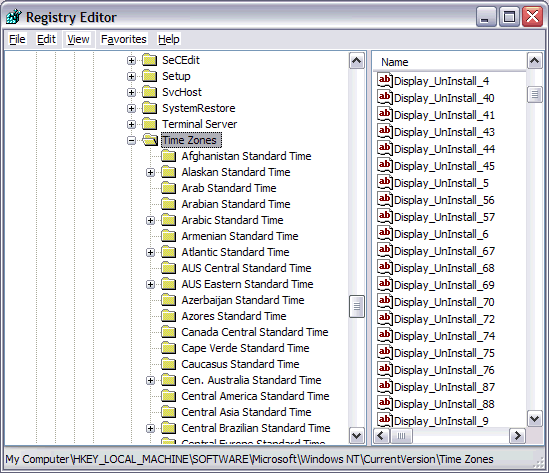

I am working on an issue related to Brazil timezone. Our code reads the DST rules from windows registry instead of tzdata.
My question is -- how do I determine whether the windows system has applied the latest timezone DST rules from the following registry? I don't know how to interpret the binary data
To access time zone rules used by Windows, you can use the API below - http://msdn.microsoft.com/en-us/library/system.timezoneinfo.getadjustmentrul... -Yoshito Umaoka

yoshito_umaoka@us.ibm.com wrote:
To access time zone rules used by Windows, you can use the API below -
http://msdn.microsoft.com/en-us/library/system.timezoneinfo.getadjustmentrul... Any way without .NET?

On 06-Nov-2008, Nicolas Alvarez wrote:
yoshito_umaoka@us.ibm.com wrote:
To access time zone rules used by Windows, you can use the API below -
http://msdn.microsoft.com/en-us/library/system.timezoneinfo.getadj ustmentrules.aspx
Any way without .NET?
Yup. Here's a start: dosprompt> REG QUERY "HKEY_LOCAL_MACHINE\SOFTWARE\Microsoft\Windows NT\CurrentVersion\Time Zones\Eastern Standard Time" HKEY_LOCAL_MACHINE\SOFTWARE\Microsoft\Windows NT\CurrentVersion\Time Zones\Eastern Standard Time Display REG_SZ (GMT-05:00) Eastern Time (US & Canada) Dlt REG_SZ Eastern Daylight Time Std REG_SZ Eastern Standard Time MapID REG_SZ 38,39 Index REG_DWORD 0x23 TZI REG_BINARY 2C01000000000000C4FFFFFF00000B000000010002000000000000000000030000 0002000200000000000000 You can decode the item TZI. 2C01000000000000C4FFFFFF00000B000000010002000000000000000000030000 0002000200000000000000 First there are three 32-bit numbers: as shown reverse bytes translate 2C010000 --> 0000012c --> 300 minutes offset from UTC 00000000 00000000 --> 0 std time offset C4FFFFFF ffffffc4 --> -60 dst offset That is timezone offset is 300 minutes; offset for standard time is 300 minutes; offset for daylight time is (300 - 60) = 240 minutes Then there are two 28-byte SYSTEMTIME structures 00000B00000001000200000000000000 00000300000002000200000000000000 The first is the change date to standard time The second is the change date to daylight time 0000 0B00 0000 0100 0200 0000 0000 0000 < ch to std tim 0000 0300 0000 0200 0200 0000 0000 0000 < ch to dst yr mon dow day hr min sec msec For each item reverse the bytes. 0 0b 0 01 02 0 0 0 0 03 0 02 02 0 0 0 Year is always 0 This says change to standard time on the first Sunday in November at 02:00:00.000 and change to daylight time on the second Sunday in March at 02:00:00.000 . I hope this helps you. Dave C.

<yoshito_umaoka <at> us.ibm.com> writes:
I am working on an issue related to Brazil timezone. Our code reads the DST rules from windows registry instead of tzdata.
My question is -- how do I determine whether the windows system has applied the latest timezone DST rules from the following registry? I don't know how to interpret the binary data
To access time zone rules used by Windows, you can use the API below -
For "freebsd-update" (binary FreeBSD base system patch and migration) I have been asked if it was possible to determine of which timezone the current installed file in /etc/localtime was, so people could have non-interactive updates with regarding to that. The timezone given by date(1) doesn't always give a good enough hint, specially not for me in Australia where EST is often confused by programs with the US version of EST... Also, being able to compare the old /etc/localtime with the newly to be installed one gives a hint on whether or not this is an important one for this machine, i.e. if you have to restart long-running services (syslog, cron) which otherwise will not notice the DST change. Consider it a feature request :-) Edwin

If /etc/localtime is a softlink, then it is trivial to determine what timezone it actually is. If it is not a softlink, then you can calculate checksums of all the installed zoneinfo files (/usr/share/zoneinfo/* ?) against the checksum of /etc/localtime. Assuming that /etc/localtime is actually one of the currently installed timezones, you should be able to determine precisely which one it is (along with any aliases for that timezone). Simillarly, you can compare the checksum of /etc/localtime with the checksum of the equivalent timezone in the to-be-installed zoneinfo files to see if the current timezone has changed, and thus requires a restart of timezone-sensitive servers. As a further refinement, you may want to consider keeping track of when timezones split (e.g. when America/Argentina/Cordoba split off America/Argentina/Salta in 2008i) so that if a user is using a timezone so that split since they last upgraded, they can at least be warned that their local time may not be correct, and giving them a list of alternatives to choose from. -Scott On Fri, Nov 7, 2008 at 8:10 AM, Edwin Groothuis <edwin@mavetju.org> wrote:
<yoshito_umaoka <at> us.ibm.com> writes:
I am working on an issue related to Brazil timezone. Our code reads the DST rules from windows registry instead of tzdata.
My question is -- how do I determine whether the windows system has applied the latest timezone DST rules from the following registry? I don't know how to interpret the binary data
To access time zone rules used by Windows, you can use the API below -
For "freebsd-update" (binary FreeBSD base system patch and migration) I have been asked if it was possible to determine of which timezone the current installed file in /etc/localtime was, so people could have non-interactive updates with regarding to that. The timezone given by date(1) doesn't always give a good enough hint, specially not for me in Australia where EST is often confused by programs with the US version of EST...
Also, being able to compare the old /etc/localtime with the newly to be installed one gives a hint on whether or not this is an important one for this machine, i.e. if you have to restart long-running services (syslog, cron) which otherwise will not notice the DST change.
Consider it a feature request :-)
Edwin
-- Scott Atwood Cycle tracks will abound in Utopia. ~H.G. Wells
participants (7)
-
 Dave Cantor
 -
 Edwin Groothuis
 -
 Fang Lu
 -
 Nicolas Alvarez
 -
 Olson, Arthur David (NIH/NCI) [E]
 -
 Scott Atwood
 -
 yoshito_umaoka@us.ibm.com