Re: [technology taskforce] ZOOM 90-Day Security Plan Progress Report: April 15

Daniel, you have been involved in technology long enough to know that there are never any real guarantees. All we can do is identify systems that SEEM to be good, and then do our best to avoid/bypass/fix problems as they are discovered. As Olivier implies, the folks at Zoom seem to be taking this seriously, and that is a MAJOR asset. I recall many decades ago (in a universe far far away?) a new product was delivered (it was a text editor). Within weeks of its delivery, there we an enormous number of bugs reported. Management almost killed the product before they were made to realize that bugs are normal in any new product (even one like this editor which had been subject to a large amount of pre-shipment usage and testing). What was unique in this case was that the product was SO GOOD (both powerful and easy to use) compared to other editors out there, that it was quickly adopted by many users and was being subject to unusually heavy use so soon after shipment. And bugs were discovered (and incidentally fixed in record time by the development team). I think that what we are seeing with Zoom at the moment is quite comparable. Alan At 2020-04-18 05:33 PM, DANIEL NANGHAKA wrote:
Are we still safe with zoom amidst all the flaws that have been identified?
There was a time when a simple flaw was discover during an ICANN meeting, and Adobe Connect was shutdown. Is there an analysis of the effects. What is the security guarantee that we have on zoom?
Daniel KN á§
On Sat, 18 Apr 2020 at 17:17, Alfredo Calderon-Serrano via ttf <<mailto:ttf@atlarge-lists.icann.org>ttf@atlarge-lists.icann.org> wrote: <https://blog.zoom.us/wordpress/2020/04/15/90-day-security-plan-progress-report-april-15/>https://blog.zoom.us/wordpress/2020/04/15/90-day-security-plan-progress-report-april-15/
[]
[]
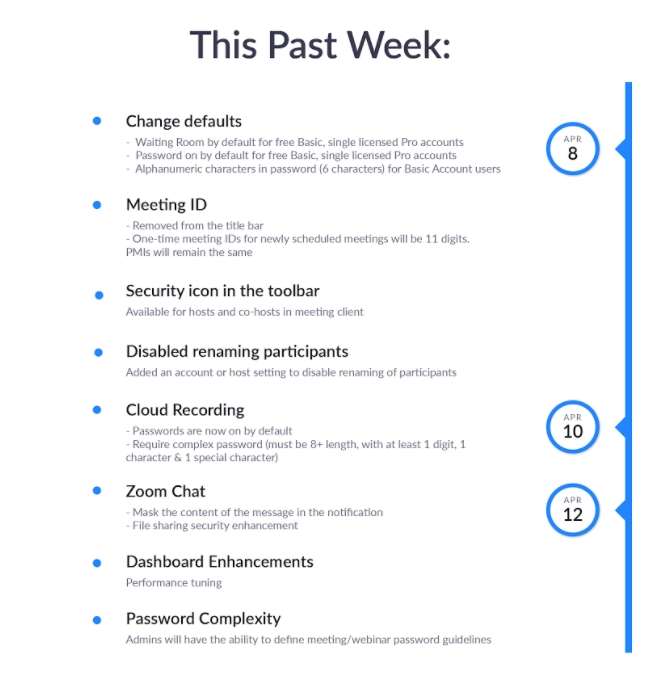
The newly released <https://blog.zoom.us/wordpress/2020/04/08/zoom-product-updates-new-security-toolbar-icon-for-hosts-meeting-id-hidden/>Security icon in the toolbar provides Zoom Meetings hosts and co-hosts with one-click access to a number of existing Zoom security features, including Lock Meeting and Enable the Waiting Room.
Changes to Zoomâs default settings
Weâve made changes to Zoomâs default meeting settings to improve security before a meeting starts. Both meeting passwords and Waiting Rooms are enabled by default for our free Basic users and single Pro users, while those in our K-12 education program need a password to join a meeting. Waiting Rooms also are on by default for those K-12 users.
Enhanced meeting password complexity
Account owners and admins can now configure minimum meeting password requirements to include numbers, letters, and special characters, or allow only numeric passwords. Free Basic account users will now use alphanumeric passwords by default instead of numeric passwords.
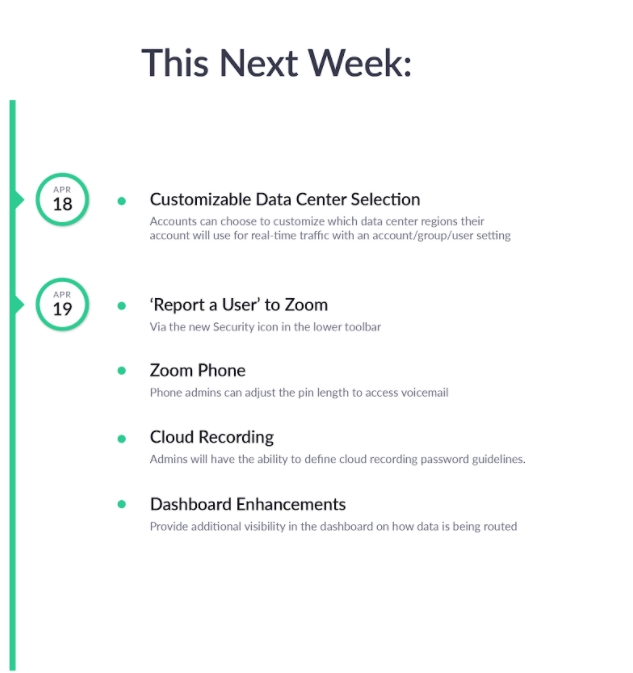
Changes to data center routing
Starting April 18, account admins will have the ability to choose whether or not their data is routed through specific data center regions, giving users more control of their interactions with Zoomâs global network. Learn more about the process in our <https://blog.zoom.us/wordpress/2020/04/13/coming-april-18-control-your-zoom-data-routing/>blog post.
Bug bounty program with Katie Moussouris of Luta Security
Zoom will be working with Luta Security to reboot our bug bounty program. Luta Security was founded by Katie Moussouris, who created some of the most important vulnerability programs still running today. She started Microsoft Vulnerability Research and Symantec Vulnerability Research, and also started Microsoftâs and the Pentagonâs bug bounty programs. Luta Security will be assessing Zoomâs program holistically with a 90-day âget wellâ plan, which will cover all internal vulnerability handling processes. Read more in Katieâs <https://www.lutasecurity.com/post/luta-security-and-zoom>blog post.
Alfredo Calderón
Sent from my iPad _______________________________________________ ttf mailing list <mailto:ttf@atlarge-lists.icann.org>ttf@atlarge-lists.icann.org https://mm.icann.org/mailman/listinfo/ttf
_______________________________________________ By submitting your personal data, you consent to the processing of your personal data for purposes of subscribing to this mailing list accordance with the ICANN Privacy Policy (<https://www.icann.org/privacy/policy>https://www.icann.org/privacy/policy) and the website Terms of Service (<https://www.icann.org/privacy/tos>https://www.icann.org/privacy/tos). You can visit the Mailman link above to change your membership status or configuration, including unsubscribing, setting digest-style delivery or disabling delivery altogether (e.g., for a vacation), and so on.
Content-Type: image/png; name="past-week.png" Content-Disposition: inline; filename="past-week.png" Content-ID: <1718f340ff6c282b48a1> X-Attachment-Id: 1718f340ff6c282b48a1
Content-Type: image/png; name="next-week.png" Content-Disposition: inline; filename="next-week.png" Content-ID: <1718f340ff6ecbabac92> X-Attachment-Id: 1718f340ff6ecbabac92
_______________________________________________ ttf mailing list ttf@atlarge-lists.icann.org https://mm.icann.org/mailman/listinfo/ttf
_______________________________________________ By submitting your personal data, you consent to the processing of your personal data for purposes of subscribing to this mailing list accordance with the ICANN Privacy Policy (https://www.icann.org/privacy/policy) and the website Terms of Service (https://www.icann.org/privacy/tos). You can visit the Mailman link above to change your membership status or configuration, including unsubscribing, setting digest-style delivery or disabling delivery altogether (e.g., for a vacation), and so on.
participants (1)
-
 Alan Greenberg